 beesolo.
How to block time off in your salon booking calendar
Plan a holiday, a half-day, or a one-off closure without leaving bookable gaps. Check existing visits, boundary times, and the first day back.
By beesolo · Published on · Updated · 5 min read
On this page
Booking a trip is easy. Making sure your calendar stays closed while you are away takes one more check: the time before you leave, the appointments already accepted, and the first slot you can actually work when you return.
For a solo salon, nobody else is covering those hours. Block the full period you cannot work, then inspect the public booking page as a client. An announcement on Instagram does not close the calendar.
Use the kind of change that matches the absence
Start by deciding whether this is a recurring pattern or an exception.
Scroll sideways to see the full table.
| Situation | What to change |
|---|---|
| You never work Mondays | Your regular weekly availability |
| You can work different hours on one particular date | That date's hours or override |
| You are away for an afternoon or several days | A time-off period covering the absence |
| You want lunch protected every working day | Your regular working pattern, with a gap for the break |
This matters when you come back. Removing your weekly hours to represent a four-day trip can leave later weeks closed too. A dated exception keeps the normal pattern available outside the absence.
beesolo separates weekly availability, date overrides, and time off. Use the availability controls that correspond to the change, then verify what clients can book.
Write the actual unavailable period before editing
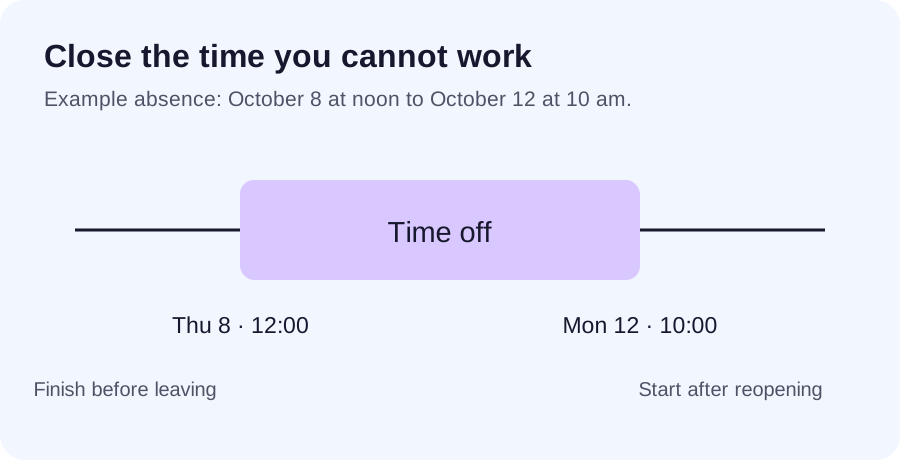
Consider this example:
- You leave the studio at noon on Thursday, October 8.
- You are away on Friday and Saturday.
- You return late on Sunday.
- You can be ready for clients at 10 am on Monday, October 12.
The absence starts at noon Thursday, not Friday morning. It ends at 10 am Monday, not midnight Sunday. Those boundary hours are easy to miss if you only think of the trip as "Friday to Sunday".
If a service takes 90 minutes, a Thursday start at 11 am would cross into the absence. The service must finish before noon. A 10:30 am start might fit exactly, but only if the reserved duration already accounts for the time you need before leaving.
Likewise, a Monday 9 am appointment is too early if you need an hour to reopen and prepare. Set the return boundary from when you can receive a client, not when you arrive at the building.
Enter the absence in the current Merchant App
Open Settings, then Availability. Under Time off, select Add time off. Check the timezone shown by the form before choosing the dates and times.
For the Bucharest example above:
- Set Starts to October 8, 2026 at 12:00.
- Set Ends to October 12, 2026 at 10:00.
- Add an optional private reason if it helps you recognise the absence.
- Select Add time off and check that the saved period appears with the intended dates and times.
The form uses local dates and times in the displayed timezone. The end must be after the start. If a clock change makes a local time invalid or repeated, choose a valid time as the form requests. Read any error before trying again; a missing or failed save does not close the schedule.
After saving, verify the public calendar at both edges of the absence. The product guide covers weekly hours, date overrides, and time off in the same place.
Deal with existing appointments separately
Before saving time off, list any accepted visits that overlap the period. Do not assume a time-off entry has cancelled them, moved them, or told the clients what happened.
For each affected appointment, record whether you have contacted the client, agreed a new time, and updated the booking. A pending message and a confirmed rearrangement are different states.
A useful message is:
Hi [name], I need to rearrange your [service] on [date] because I will be away from the studio. I can offer [time one] or [time two]. Would either work for you? I will confirm the change once we agree a time.
If you can honour a visit before leaving, keep it only if the full appointment fits. Do not leave a small exception that forces you to rush the service or miss your departure.
Check the public calendar at both edges
After saving the absence, open your public booking page on a phone. Choose a short service, then repeat with one of your longer services.
For the example above, check:
- Thursday morning still has the appointments you intend to offer.
- No service can start before noon and run into the blocked period.
- Friday and Saturday offer no starts during the absence.
- Monday offers nothing before 10 am.
- Later working days still follow your normal hours.
The long-service check matters. A short appointment may fit beside a block while a colour appointment correctly does not.
If the holiday is outside your current booking horizon, an empty date does not prove the block works. It may be unavailable simply because clients cannot book that far ahead yet. Save the absence now and check again when those dates enter the bookable range. The booking-notice guide explains the difference between horizon and notice.
Tell clients what they can do while you are away
A useful absence message gives the dates, your next working day, and an action. It does not need a long explanation of your plans.
I am away from the studio from [date] to [date] and back for appointments on [date]. You can see my next available times at [public booking link]. I will reply to other messages after I return.
Only promise the reply timing you can keep. If you will check messages occasionally, say that without making yourself permanently available during the break.
For regular clients with appointments just before you leave, mention the absence when it affects their next visit. Avoid creating urgency around every slot; give them the information they need to plan.
Keep the first day back workable
Before leaving, check the first day's bookings, supplies, and preparation. If you need a reopening hour, reserve it. If you plan to answer accumulated messages between clients, give that work space too.
On return, inspect the public calendar once more. Check that the temporary block has ended and that you did not accidentally change your recurring hours. Then look at any rearrangements still awaiting a client's response.
For a one-off afternoon away, the same process is smaller: define the boundary, handle overlapping visits, save the time off, and verify the two adjacent appointment periods. The length of the absence changes; the checks do not.
Explore the beesolo booking page or browse more practical booking guides.