 beesolo.
How to reduce salon no-shows: a practical checklist
Work out why appointments are being missed, then fix the relevant part of booking. Includes confirmation wording, a simple review log, and follow-up messages.
By beesolo · Published on · Updated · 5 min read
On this page
An empty chair does not tell you why the client is missing. They may have forgotten, confused the date, struggled to find the entrance, or tried to cancel through a route they could not use.
Start there. A stricter policy will not fix a wrong map pin, and another reminder will not fix an appointment the client thought was still waiting for confirmation.
For a solo salon, the most useful approach is to make the appointment clear, make changes possible, and record what happened when a visit is missed. Then change the part that is causing the problem.
Look at the last few missed visits
Review a small recent set before changing your process. Use factual notes, not labels such as "unreliable client". If you do not know the reason, record it as unknown.
Scroll sideways to see the full table.
| What happened | What to investigate | A useful correction |
|---|---|---|
| Client arrived on the wrong day | How the date appeared in the conversation and confirmation | Include the weekday, full date, and time together. |
| Client thought the booking was a request | The final screen or reply they received | Make the confirmed status explicit. |
| Client went to the wrong entrance | Address, pin, building name, and arrival instructions | Add the missing entrance detail. |
| Client tried to cancel but could not | Appointment link, online cutoff, and contact route | Provide a direct way to reach you after online changes close. |
| Client forgot | Whether they had usable confirmation details | Check the confirmation and your reminder process. |
| No explanation | Whether contact details are correct | Send one calm follow-up and leave the reason unknown until they respond. |
Some missed visits will remain outside your control. The table helps you avoid redesigning the whole booking process because of one unexplained absence.
Make the confirmation useful away from your website
A client may look for the details in a message while travelling to the studio. They should not need to reconstruct the appointment from several conversations.
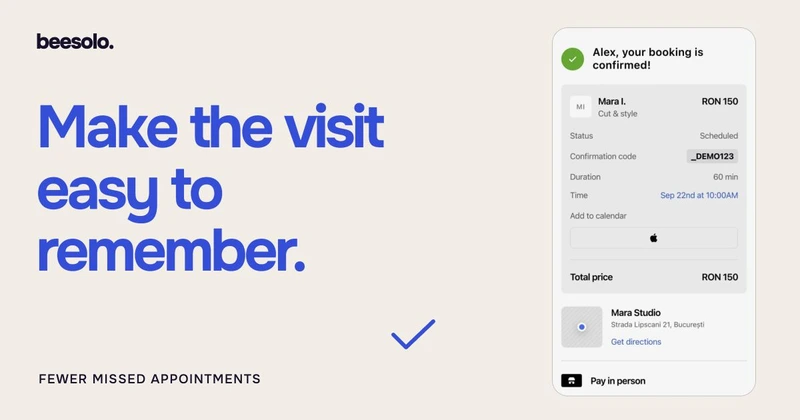
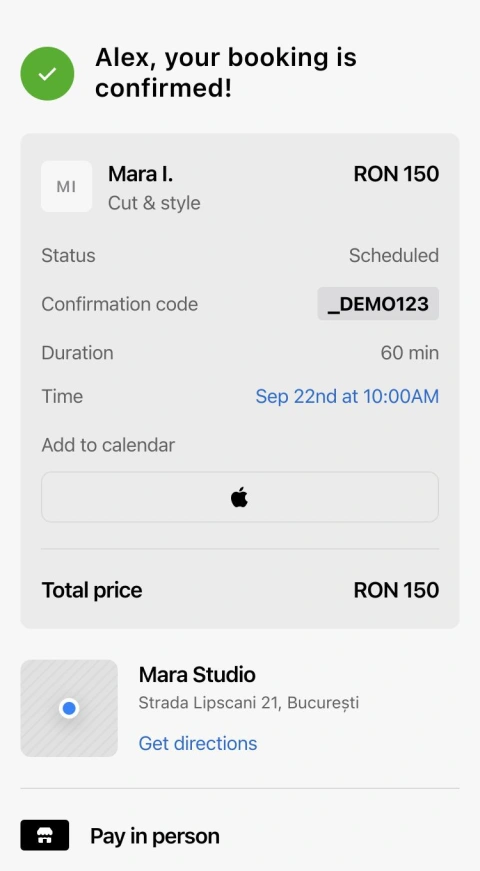
A practical confirmation states who the visit is with, the service, date, time, location, and how to make a change. Include a price where it has been agreed. Use the full date rather than "next Friday", which becomes unclear when someone rereads the message later.
Here is an editable example for a manual confirmation:
Hi [name], your [service] with [professional] is confirmed for [weekday, date] at [time].
Allow [duration]. The price is [amount].
Find me at [address and entrance detail].
Your appointment details: [appointment link].
If you cannot use that link, contact [business number].
Use the client's appointment link in a private confirmation, and your general booking page in public marketing. They have different purposes.
Use reminders to repeat the action, not the whole policy
If you send a reminder, make it short enough to use. The client needs to recognise the appointment and know what to do if their plans have changed.
Hi [name], a reminder of your [service] tomorrow, [weekday and date], at [time]. I am at [address]. Your appointment details are here: [appointment link]. Open the link and verify your booking email to cancel or reschedule a single appointment online up to one hour before the start. Rescheduling keeps the services and price the same. For service changes or help after that cutoff, contact [business number].
Send it early enough for your requested notice period to be meaningful. A message sent 30 minutes before an appointment cannot help someone comply with a 24-hour request they never saw earlier.
This is a wording template for your communication process, not a claim that beesolo has a configurable reminder-message editor. Check what your own setup sends before adding manual messages, so the client does not receive conflicting details.
Make a cancellation easier than disappearing
A client who knows they cannot come needs an obvious next action. Give them the appointment link and a direct contact route if online cancellation is no longer available.
In beesolo, clients verify their booking email through their secure appointment link to cancel or reschedule a single appointment online up to one hour before the start. To reschedule, they choose an available time and confirm it. The services and price stay the same, and the original time stays booked until the change succeeds. For service changes, help finding a suitable time, or help after the online cutoff, they contact the professional. If your policy asks for more notice, explain that as a separate request. The cancellation-policy template shows how to word the difference.
When a cancellation arrives, update the actual booking. A message saying "I cannot make it" does not by itself free your calendar. Check that the time is available again before offering it to someone else.
Follow up without guessing the reason
If someone has missed the visit and has not contacted you, a short message is enough:
Hi [name], we missed you at [time] today. I hope you are okay. Please get in touch before booking another visit so we can check what happened.
If they respond, record only the detail needed to improve the next visit. "Client used the rear entrance; sent street-door instructions" is useful. Speculation about their personal life is not.
For repeated missed visits, discuss future arrangements directly. A broad new rule aimed at one person can make booking harder for everyone else.
Measure the result with a small, honest log
A notebook or spreadsheet is enough to start. Record appointment date, outcome, known reason, and follow-up. Keep completed visits, no-shows, and cancellations as separate outcomes so a useful cancellation does not look like an unexplained absence.
Download the attendance log and the field guide. The file contains two clearly labelled sample rows and blank rows for your own entries. Delete the examples before calculating your results.
Use one of four outcomes: attended, no-show, cancelled in advance, or cancelled late. Choose and record your own definition of late cancellation, consistently with your policy. Record a reason only when known. Use a booking reference rather than copying private client details into another file.
The refill field records a separate result: whether a released opening was booked again. A cancelled visit that was refilled remains a cancellation in the original row; do not relabel it as attended.
For a simple attendance measure, compare no-shows with visits that were still expected to go ahead. If 47 clients attended and 3 did not, that is 3 out of 50, or 6%. Label the period and denominator when comparing it with another month. This is an example calculation, not a benchmark.
Track late cancellations separately too, since they can still leave time unfilled. After changing an arrival message or confirmation, look for that specific problem in the next set of appointments. Fewer wrong-door arrivals tells you more about the fix than a small change in an overall percentage.
Explore the beesolo booking page or browse more practical booking guides.