 beesolo.
Instagram booking links for barbers and solo salons
A haircut photo gets someone interested. Help them choose the right appointment with a clear bio, useful captions, and one booking link.
By beesolo · Published on · Updated · 5 min read
On this page
Someone saves your haircut photo on Tuesday. On Friday, they come back ready to book. Your bio says "DM for appointments", so they send a message while you have a client in the chair. By the time you answer, they have put their phone away.
An Instagram booking link gives that person a way to finish the job while you work. The useful journey is simple: see a result, recognise the service, choose a time. The part that needs care is connecting those steps.
Send people to a page where they can make a decision
For a solo barber or stylist taking appointments, put your public booking page first. A new client needs to see what you do, where you work, what the appointment costs, and which times they can book.
A page with several links can still make sense if you also sell products or teach. Give the appointment link a specific title, such as "Haircuts: prices & booking". "My links" makes someone do more work to find it.
Use the public URL you would share with any new client. In beesolo, that page brings your work, location, services, and booking together. An owner dashboard URL or an individual booking confirmation link is the wrong destination.
Open the link on your own phone before adding it to your profile. If you find yourself explaining something the page leaves out, fix that first. The booking page checklist covers the details that help a stranger decide.
Add the destination to your profile
In the Instagram mobile app, open your profile and choose Edit profile. Look for Links, then the option to add an external link. Paste the full public booking address, give it a title such as "Services & appointments", and save. Labels can vary with the app version. This is an ordinary external link, not a booking-provider integration.
Return to the public profile and open the saved link. If the app rejects the address, copy it again from the working page rather than typing it from memory. If a different page opens, edit the saved destination. A URL written only in the bio text is not the same as adding it through the links control.
For wording you can adapt, use the bio example library. Keep this check focused on whether the destination works.
Write a bio that answers the first questions
A client may arrive from a shared post without knowing your name or city. Give them those facts before a slogan.
For a barber:
Adi · barber in Bucharest
Fades, scissor cuts & beard trims
Prices and appointments below
For an independent stylist:
Mara · hair stylist in Bucharest
Bobs, lived-in cuts & colour maintenance
Choose your service and book below
These are examples, not claims about a real business. Replace the specialisms with work you actually offer. If you work from a private studio, the neighbourhood can help people judge the journey, with precise arrival instructions shared at the appropriate stage.
Add your external booking URL through the links controls in your Instagram profile editor. Give the link a useful title and save it. This uses an ordinary profile link; you do not need to describe it as an Instagram booking integration.
Make the caption name the service
"Appointments available, link in bio" tells someone where to go. It does not tell them which appointment created the result they want.
Compare these two captions for the same bob:
Fresh cut. A few spaces next week. Link in bio.
A chin-length bob with a soft, tucked-under finish. Keeping your current bob in shape? Choose "Cut & style" through my booking link. If you are changing from long hair to a bob, message me first so I can allow time for the restyle.
The second caption does useful sorting. A regular maintenance client can book. Someone planning a larger change knows to ask first. Your service descriptions should make the same distinction, otherwise the caption and menu give different advice.
Use a recent result that represents the appointment, including its limits. A lengthy colour transformation is a poor illustration for a short colour-maintenance service unless the caption explains the difference.
Keep a reply for the questions that repeat
You can send a personal answer without negotiating every available hour in messages.
For a returning client:
Hi [name], for your usual cut, choose "Cut & style" here: [public booking link]. It shows the times that fit that service. If none works for you, tell me which day you had in mind.
For someone unsure what to book:
Hi [name], are you keeping your current shape or planning a change? Send me a little about the result you want and I will point you to the right appointment.
For a colour enquiry that needs a conversation:
Thanks for sending the photo. Before we choose a colour appointment, I need to understand your current colour and the change you want. Let's arrange a consultation first.
The last two replies deliberately do not rush someone into a slot. A booking link is useful when the service is clear. It cannot make a professional judgement about the work required.
Try the journey from the post, not from your dashboard
Open Instagram as a visitor would. Find the post, read its caption, go to your profile, and follow the saved link. Use Instagram's in-app browser for this check.
Choose the service the caption names. Check its price and duration, then find a date. In beesolo, the client continues in their browser without creating a client account.
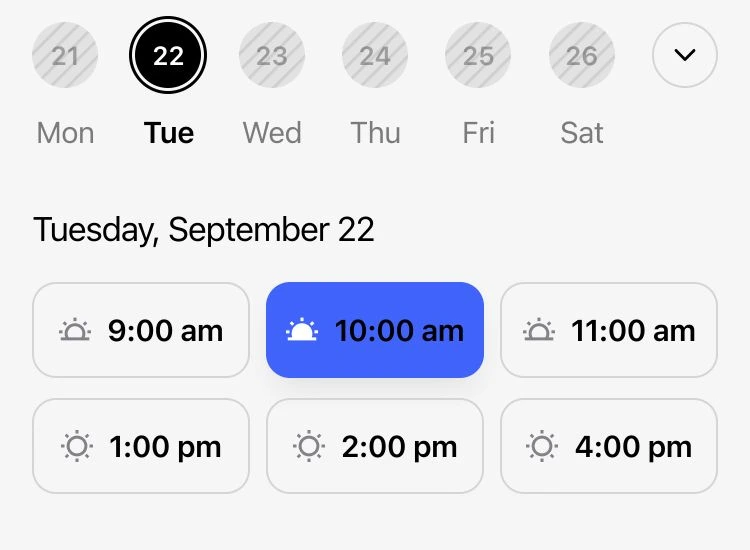
If there are no times, look at the schedule before replacing the link. A full day, time off, or a minimum notice rule may be doing exactly what you asked it to do.
Let the next question tell you what to fix
Keep a note of the booking questions you receive for a week. They are more useful than guessing which part of your bio sounds best.
Scroll sideways to see the full table.
| What people ask | What to change |
|---|---|
| "Where are you based?" | Put your city or neighbourhood in the bio and make the location clear on the booking page. |
| "How do I book?" | Make the link title explicit and put it ahead of less relevant links. |
| "Which one is the cut in your post?" | Use the same service name in the caption and booking menu. |
| "Can I have 4 pm? It is not showing." | Check whether the complete service fits and whether notice rules exclude it. |
| "Did my appointment go through?" | Check the confirmation step and the contact details used for the booking. |
Fix the repeated question, then watch whether it returns. Posting more often will not solve an unclear service menu.
Explore the beesolo booking page or browse more practical booking guides.